How I Connect AI Agents to Real Python and C++ Tools
In my previous post, I broke down why an AI agent needs a 63-tool MCP server to do serious creative work. But the architecture of how an LLM talks to a local file system—and specifically, to high-performance C++ binaries—is where the real engineering happens.
Language models natively output text. To make them perform actions, we have to serialize their intent into strict JSON payloads, validate those payloads against a schema, and route them to native execution layers.
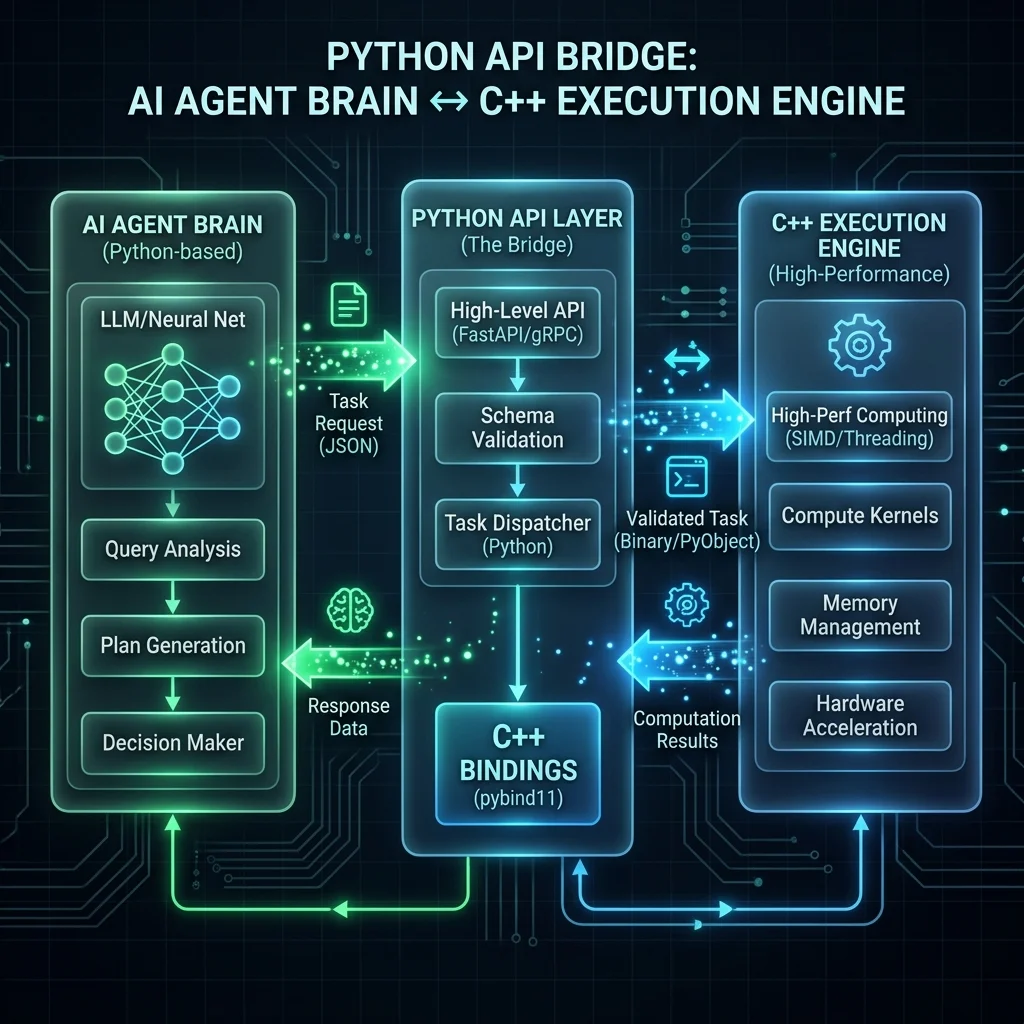
The Python Orchestration Layer
Python is the undisputed king of AI orchestration. Libraries like LangChain, LlamaIndex, and native SDKs make it incredibly easy to parse model outputs. However, Python is not the king of processing 4K video frames or doing heavy pixel matrix operations.
To solve this, I use Python strictly as an API Gateway and Validation Layer.
When an AI agent wants to resize an image and apply a LUT (Look-Up Table), the Python MCP server intercepts the request:
def apply_lut_and_resize(input_path: str, lut_path: str, width: int, height: int):
    # 1. Python Validates the input
    if not os.path.exists(input_path) or not os.path.exists(lut_path):
        raise ValueError("Paths do not exist.")

    # 2. Python calls the C++ extension
    import creative_engine_cpp
    result = creative_engine_cpp.process_image(
        input_path, lut_path, width, height
    )

    # 3. Python returns the result to the Agent
    return {"status": "success", "new_hash": result.hash}
The C++ Execution Engine
Why go through the trouble of writing C++ extensions for Python? Because when an AI agent is iterating on a creative task, latency kills the workflow.
If an agent needs to trim 15 clips to find the right action sequence, a pure Python implementation using moviepy might take minutes per clip, causing the LLM to timeout or lose context.
By writing a custom C++ engine using FFmpeg's libavcodec and OpenCV, the actual execution time drops to milliseconds.
Using Pybind11
To connect the two, I rely heavily on pybind11. It allows me to expose my C++ functions directly to Python with minimal overhead.
#include <pybind11/pybind11.h>
#include "MediaEngine.h"

namespace py = pybind11;

PYBIND11_MODULE(creative_engine_cpp, m) {
    m.doc() = "C++ Media Execution Engine for AI Agents";

    m.def("process_image", &MediaEngine::ProcessImage,
          "Resize and apply LUT to an image deterministically",
          py::arg("input_path"), py::arg("lut_path"),
          py::arg("width"), py::arg("height"));
}
Bridging the Context Gap
The most important part of this bridge isn't just sending commands to C++; it's getting context back to the AI.
If a C++ operation fails (e.g., a corrupted video frame), it must not crash the MCP server. It must throw a structured exception that Python catches and translates into a natural language error for the LLM.
"The C++ engine reported a corrupted frame at 00:01:23. Would you like to attempt a recovery pass or trim the video before this timestamp?"
This bidirectional communication is what changes an AI from a blind script-runner into an active, problem-solving collaborator.